
File System Connector
A File System Connector is used to access the files in a folder on your web server or network. Consider for example the scenario where you might want to set up a working folder for your application, in the form of a secure folder on your server or network, from where files could be read or updated.
Do this:
- Add a File System Connector to your application.
- Provide your folder’s path and, if required, provide it with valid user credentials to access the folder.
- Once the connection is created, you can start reading, writing or deleting files from your ‘workspace’ by adding the relevant file function to a script or Event handler. You can even assign image files directly to an Image control or allow users to download files to their local PC.
Note: The connector will have access to the specified folder and its sub-folders, but will have no access to any of the parent folders.
Add a File System Connector and a file function {% endembed %}
Connection Editor Properties
Section titled “Connection Editor Properties”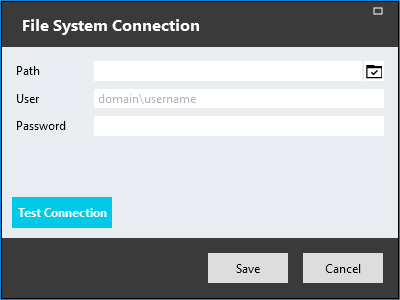
-
Path
This is the folder path on the server or network that will be made accessible via this connector.
Note: Stadium currently supports UNC paths, but not mapped drives yet.
-
User
The username to gain access to the folder. This is in the format of <domain name>\<username>.
If no value is provided for this property, the Application Pool User will be used. -
Password
The password that will be used in combination with the username to gain access to the folder.