Styles
You can style the way your Pages and controls will be displayed in a browser.
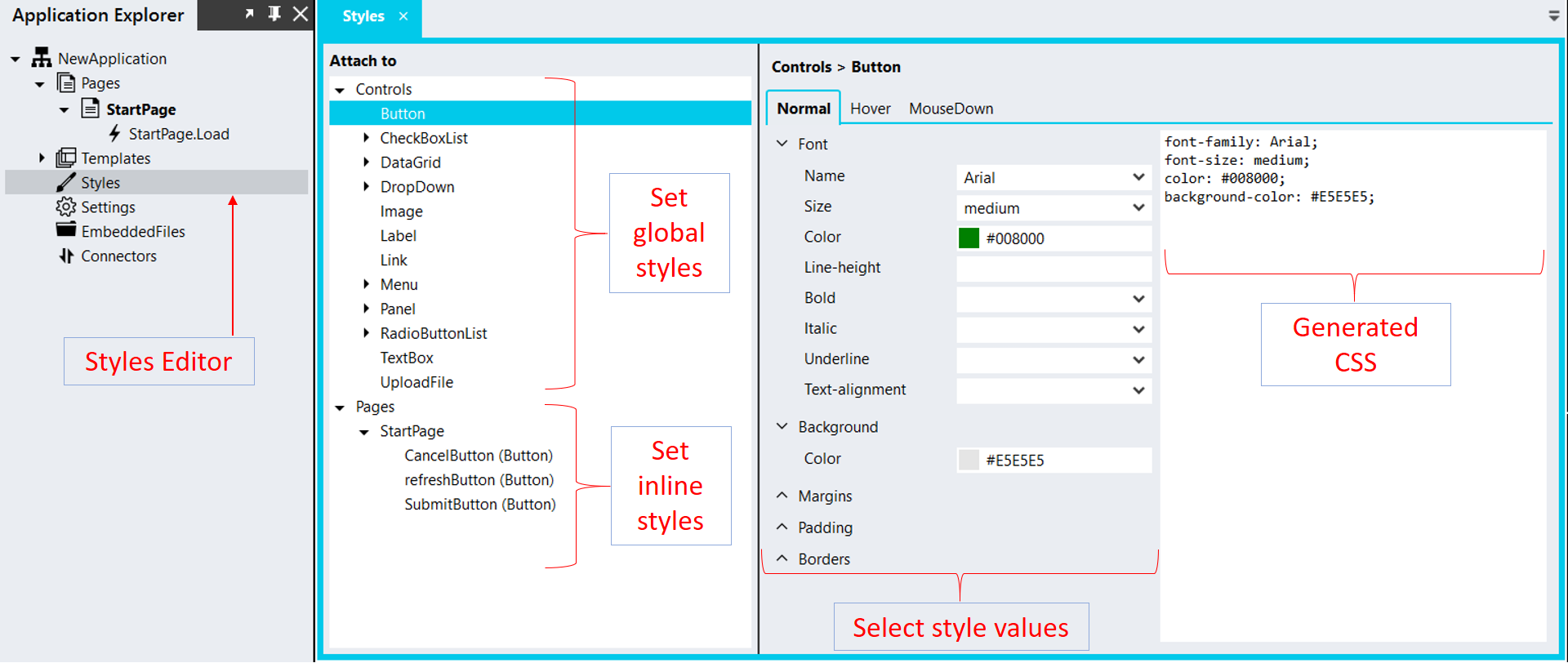
The Styles Editor makes it easy to create styles without knowing the details of Cascading Style Sheets (CSS).
Note: Styles defined in the Styles Editor have a very high specificity and are difficult to override.
Add styles {% endembed %}
How to use the Styles Editor
Section titled “How to use the Styles Editor”- Select Styles from the menu on the left.
- To set ‘global’ styles, select the Control for which you want to set styles (e.g. Button).
- To set ‘inline’ styles for specific instances of a control, select the control listed on the relevant page for which you want to set styles (e.g. Button1 on the StartPage).
- Select the relevant style values (e.g. blue) for the style parameters you want to set (e.g. the font color).
Note:
- Global styles will apply to all the instances of the particular control type (e.g. button).
- Styles you set for a specific instance of a control will override the global style settings.
- If you also created styles with the StyleSheet editor, for any duplicate ‘global’ styles the styles from the stylesheet will override the styles created with the Styles Editor.